DocsAccount & settings
Roles and permissions
Decide what each WordPress role can do with Native WP AI — open the builder, change layouts or only content, use AI, change the design system, manage templates, forms, code, analytics and reports.
Go to Native WP AI → Settings → Permissions: a matrix of WordPress roles and Native WP AI permissions. Administrators always have every permission (and so do super admins on multisite).
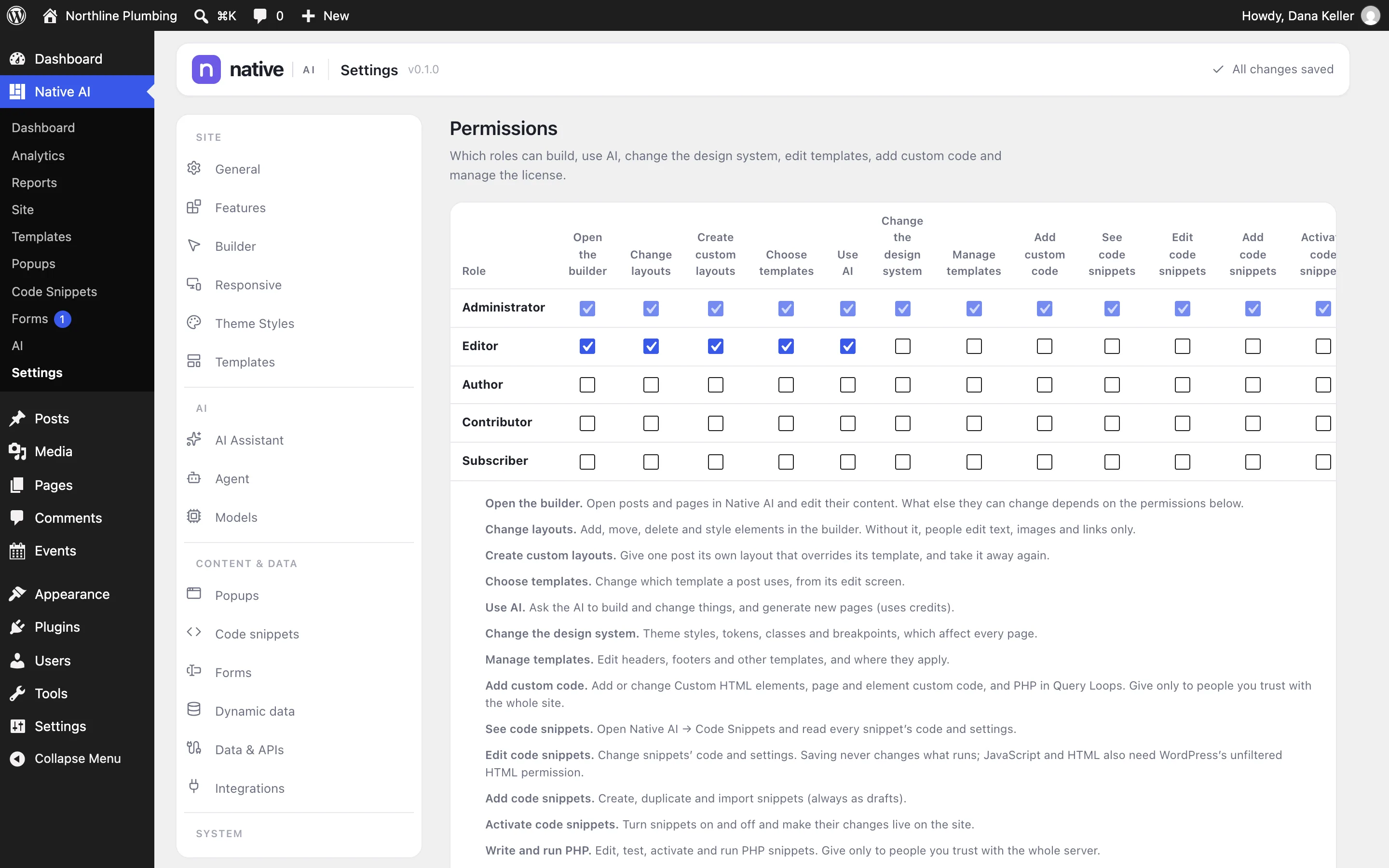
Every permission#
| Permission | Allows | By default |
|---|---|---|
| Open the builder | Open posts and pages in Native WP AI and edit their content. What else people can change depends on the permissions below. | Administrators, Editors |
| Change layouts | Add, move, delete and style elements. Without it, people edit text, images and links only. | Administrators, Editors |
| Create custom layouts | Give one post its own layout that overrides its template, and take it away again. | Administrators, Editors |
| Choose templates | Change which template a post uses, from its edit screen. | Administrators, Editors |
| Use AI | Ask the AI to build and change things, and generate new pages (uses credits). | Administrators, Editors |
| Change the design system | Theme Styles, tokens, classes and breakpoints, which affect every page. | Administrators |
| Manage templates | Edit headers, footers and other templates, and where they apply. Also popups. | Administrators |
| Add custom code | Add or change Custom HTML elements, page and element custom code, and PHP in Query Loops. Give only to people you trust with the whole site. | Administrators |
| See / Edit / Add / Activate code snippets | Read snippets; change them; create, duplicate and import them (as drafts); turn them on and off. | Administrators |
| Write and run PHP | Edit, test, activate and run PHP snippets. Give only to people you trust with the whole server. | Administrators |
| Manage snippet secrets | Add and change encrypted values that PHP snippets use. | Administrators |
| See snippet logs | Read and clear snippet errors and activity. | Administrators |
| Manage forms | See submissions, analytics and logs, and choose where forms send them. | Administrators |
| Connect integrations | Add and change integration connections (API keys, OAuth, webhook URLs) and data sources. | Administrators |
| See analytics | Open Native WP AI → Analytics. The AI can answer analytics questions for them. | Administrators |
| Manage analytics | Change Analytics settings, goals and alerts, and reset analytics data. | Administrators |
| See SEO | Open Native WP AI → SEO and change the SEO of pages they can edit. | Administrators, editors |
| Manage SEO | Change SEO settings, redirects and imports, run audits and start AI jobs for many pages. | Administrators |
| See / Generate / Export reports | Read reports and the activity history; create reports; download them as PDF and email them. | Administrators |
| Manage reports | Change report templates and settings, mark problems resolved, delete reports. | Administrators |
| Manage report schedules | Create, change and run scheduled reports and choose who receives them. | Administrators |
| See the CRM | Open Native WP AI → CRM: contacts, lists, tags, segments, automations and campaign results. The AI can answer questions about contacts for them. | Administrators |
| Manage contacts | Add, change, import, export and delete contacts; manage lists, tags, segments and fields; draft automations and campaigns. | Administrators |
| Email contacts | Send campaigns and test emails, switch automations on, start contacts in them, and change the CRM’s email settings. | Administrators |
| See email delivery | Open Native WP AI → Email: the status of email sending and the log of emails sent. The AI can answer questions about the log for them. | Administrators |
| Manage email delivery | Add and change sending connections and email settings, send test emails, send logged emails again and clear the log. | Administrators |
| Manage cookie consent | Change the cookie banner and its settings, scan the site, choose categories, and see, export and clear the consent log. | Administrators |
| Manage memberships | Add and change membership plans and content rules, make people members or end their membership, and set who can see a page. | Administrators |
| Manage courses | Every course, student, grade, group and certificate, and the courses’ settings. | Administrators |
| Teach courses | See the students of the courses they write or co-teach, grade their essays and assignments, and read their reports. Instructors get it, with permission to write their own courses. | Administrators, Instructors |
| Manage automations | Build, switch on, test and delete automations and read their runs. Automations act with the permissions of the person who made them. | Administrators |
| Manage security | Change the firewall, sign-in protection and hardening, block addresses, and run and act on the security scan. Settings and file changes also need WordPress’s permission to manage options. | Administrators |
| Manage permalinks | Change pages’ and categories’ addresses, their formats and redirects, and run bulk address changes. | Administrators |
| Manage roles | Create, change and delete roles and capabilities, and change people’s roles. Give only to people you trust with the whole site; it also needs WordPress’s own permissions to manage options and promote users. | Administrators |
| Manage the license | Activate or deactivate the license and see credits. | Administrators |
Code Snippets, Analytics, SEO, CRM, Email delivery, Cookie consent, Memberships, Courses, Permalink manager, Role editor and Security permissions only show while those features are switched on. The WooCommerce Storekeeper uses WooCommerce’s own permissions (view reports, edit products, edit orders, edit coupons, manage WooCommerce), set by WooCommerce’s roles such as Shop Manager.
WordPress permissions still apply#
- Publishing needs WordPress’s own permission to publish that kind of post.
- Saving site menus needs WordPress’s menu permission (Appearance → Menus).
- JavaScript, HTML and head or footer code need WordPress’s unfiltered HTML capability.
- Form actions that create users or publish posts need those WordPress permissions.
The AI works with the same permissions#
The AI acts in the signed-in person’s own session: it can never do more than they can. For someone with Open the builder but not Change layouts, it only edits content too.
Related articles
Still have a question? Email us at support.