FeaturesBuildInteractions & motion
Motion and interactivity, set up in the builder
Make elements move and respond without writing JavaScript. Motion & effects adds entrance animations, hover effects and parallax. Interactions go further: when something happens (a click, scrolling into view, exit intent, a form sent), do something (show, hide, animate, open a popup, remember a choice) — with conditions and sequences.
- 22 animations and 10 ready presets
- 30 triggers and 27 actions, with conditions
- Respects visitors who prefer reduced motion
Motion & effects
Give any element an entrance animation — fade, slide, scale, blur, flip, reveal — and choose when it starts, the easing, duration, delay, distance and starting opacity. Play it once or every time it scrolls into view. Add a hover effect or parallax.
Visitors who ask their device for reduced motion see the element without movement.
- Entrance animations with timing controls
- Hover effects and parallax
- Reduced-motion aware

When this happens, do that
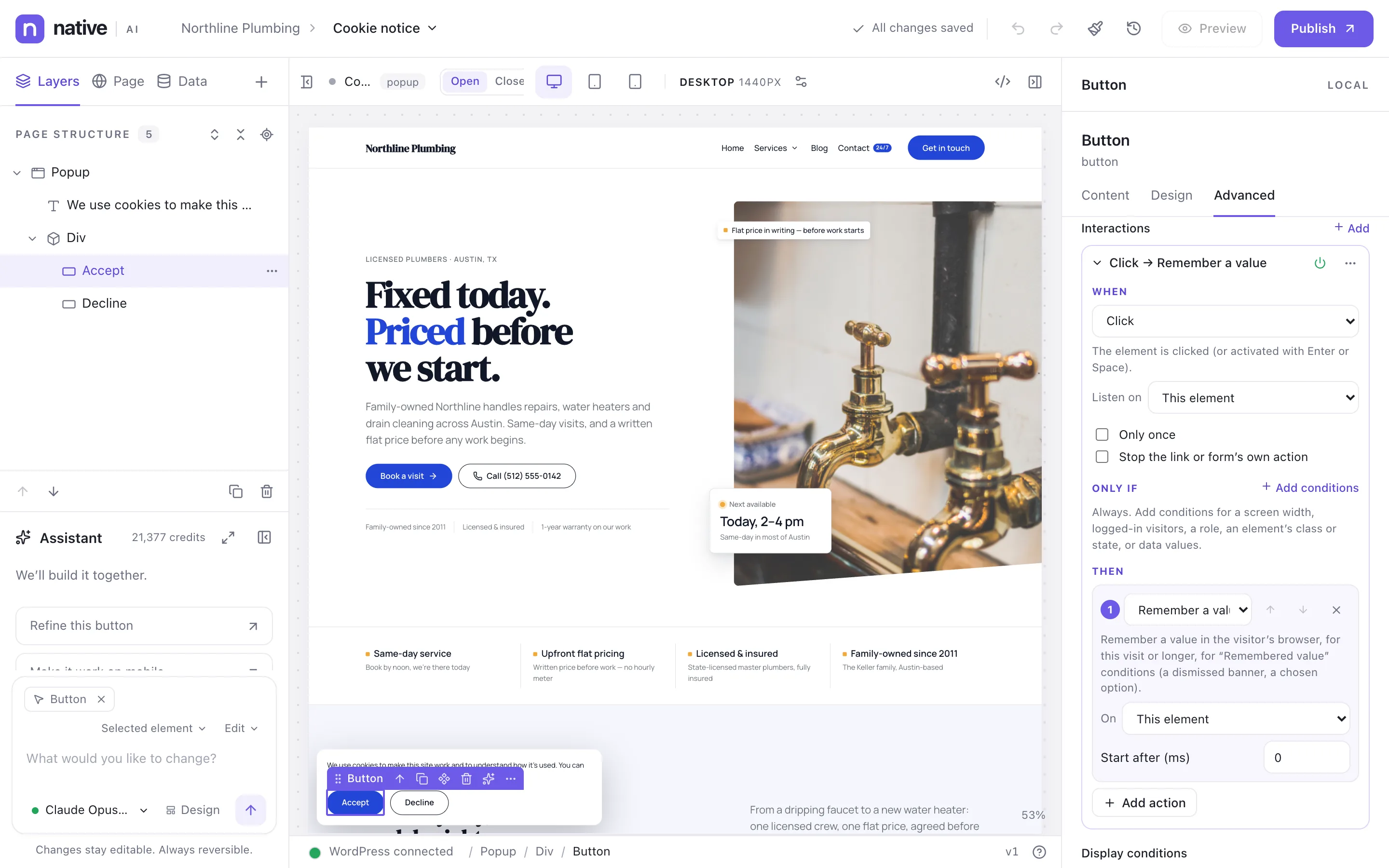
An interaction has a trigger, optional conditions and a sequence of actions. The cookie notice in the picture remembers the visitor’s choice when Accept is clicked, then closes. Build tabs, toggles, sticky headers, reveal-on-scroll lists, copy-to-clipboard buttons or progress bars the same way.
Conditions narrow when it runs: screen width, logged-in visitors, a role, an element’s class or state, or data values.
- Triggers: click, hover, focus, scroll into view, scroll progress, load, key press, exit intent, inactivity, time on site, form sent, popup opened …
- Actions: show, hide, toggle, classes, styles, animate, scroll to, open popup, set text or image, play, copy, remember, track …
- Conditions and multi-step sequences
Interactions & motionEverything included
Everything in interactions & motion
Motion
- 22 animations (fade, slide, zoom, scale, blur, flip, reveal, lift, pulse, shake …)
- Start on load or on view, once or every time
- Easing, duration, delay, distance, opacity
- Hover effects and parallax
Interactions
- 30 triggers
- 27 actions
- Conditions (screen width, visitor, role, state, data)
- Sequences with delays
- Remembered values for later conditions
- Analytics events from interactions
Presets
- Fade up in view
- Stagger children
- Sticky header state
- Reveal next
- Hover lift
- Scroll to top
- Copy text
- Progress bar
Questions about interactions & motion
Can I add my own JavaScript to an interaction?
A JavaScript action exists for people with the custom code permission. Everything else is built without code.
Works well with
Build your next WordPress site with AI you can edit.
Native AI is in early access. Tell us about your sites and we’ll set you up with a license.